

Reserve Trading and Information Exchange
The precondition for participating on Fingrid’s reserve markets is the right and correct exchange of information between balancing service providers and Fingrid. Information exchange requirements and implementations vary slightly between different reserve markets.
Trading platforms
Two trading platforms, i.e., market management systems, are used in the reserve markets: Vaksi and Fifty NMMS. Vaksi is a trading platform maintained by Fingrid, used in the FFR and FCR hourly markets, as well as in the aFRR and mFRR energy markets. Fifty NMMS (Nordic market management system) is a Nordic trading platform used in the aFRR and mFRR capacity markets. Finnish reserve providers submit their aFRR and mFRR capacity bids to the NMMS platform, except in fallback situations where capacity bids are also entered through Vaksi.
As a rule, reserve providers submit their bids to the trading platforms using XML messages via the ECP data exchange channel, but the platforms can also be operated directly through a user interface. Through the trading platforms, reserve providers can submit and modify bids, as well as view accepted trades. Both platforms are internet-based. Results of trading in the capacity markets and activations in the energy markets are exchanged via XML messages. aFRR energy market activations are ordered by Fingrid via a real-time data exchange signal.
Fingrid grants access to both trading platforms for balancing service providers and their service providers when needed. The allocation of reserve products across the platforms is shown in the table below.
|
|
mFRR capacity market |
mFRR energy market |
aFRR capacity market |
aFRR energy market |
||
|
VAKSI |
x* |
x |
x* |
x |
x |
x |
|
Fifty NMMS |
x |
|
x |
|
|
|
*Fallback/exceptional situations
Real-time data exchange
Real-time data reporting between Fingrid and the balancing service provider is carried out via the FEN or KoVa FEN network, or through web‑based data transfer. Depending on the reserve product, either a FEN connection or a KoVa FEN connection is required.
Instructions
Detailed instructions about the reserve market trading platforms and data exchange are available in the attachments, specifically in Fingrid’s Reserve Trading and information exchange guidelines and in the implementation guides for the different markets. The attachments also include a signal list of the required real‑time and history signals.
What is ECP/EDX?
For successful data exchange between the balancing service provider and Fingrid on the trading platforms, the BSP must have ECP and EDX in use.
ECP (Energy Communication Platform) is a data exchange system maintained by ENTSO‑E, the cooperation organization of European transmission system operators. It provides a secure and reliable way to transfer electronic messages between TSOs and other market participants. ECP is based on the MADES standard (Market Data Exchange Standard), which ensures that only the correct recipient can read the message data. The reserve provider installs the ECP endpoint client software.
ECP is the primary channel for data exchange on the new Nordic and European market platforms. eSett also uses ECP in its operations.
EDX (ENTSO‑E Data Exchange) is an extension to ECP that enables, among other things, the publication of services. A Nordic TSO can publish services in the EDX Service Catalogue, which customers can access through their own EDX Toolbox client software. In addition, EDX includes extensive interface capabilities, such as Kafka and FTP.
The balancing service provider deploys the software by setting up an ECP/EDX endpoint, which is then registered in Fingrid’s ECP network. The reserve provider also needs a BSP‑specific EIC X code and EIC V codes for each endpoint created. These codes are used in message exchange to identify the sender and receiver, and to control who has access to the data. Instructions for obtaining EIC X and EIC V codes can be found here.
A requirement for deployment is that the participant has separate endpoints for both test and production use, and that the ECP/EDX Terms of Use document has been signed.
The ECP software is free to use, and it can be registered either by the balancing service provider or by their service provider. From the BSP’s perspective, the cost components to consider are:
- Deployment (more on deployment below).
- Integrating the required business applications into the ECP/EDX software.
- Maintenance work. Mandatory updates occur approximately twice a year. Fingrid will remove the registration if the software is not updated by the required deadlines.
ECP/EDX deployment
Detailed instructions for deploying the software are described in the Nordic ECP/EDX Group’s (NEX) guide intended for all Nordic participants. The guide is available under the section Useful links and documents.
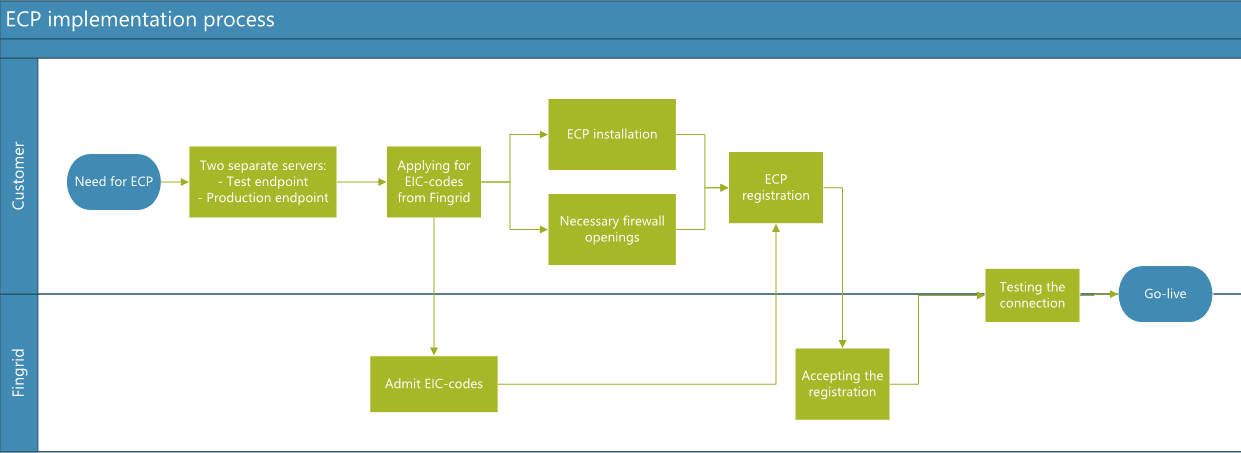
On a high level, the ECP deployment process is as follows:
- You need two separate servers for ECP: one for the test environment and one for the production environment.
- Request EIC X and EIC V codes from Fingrid. Note that you need at least two EIC V codes: one for the test endpoint and one for the production endpoint. Instructions for applying for EIC codes can be found here.
- Install the software (both ECP and EDX) following the NEX installation instructions. The “Installation Guide tailored for the Nordics” is available here.
- Configure the necessary firewall openings for outgoing traffic.
- Register the ECP endpoint. For this you need a registration file, which you can obtain by contacting: support@fingrid.fi.
Note: Registration on an endpoint cannot be completed until the EIC V code has been issued. - Fingrid uses general terms of use for ECP/EDX (see attachments). Review the terms and send a signed version to Fingrid.
- After the terms are signed, Fingrid approves the registration.
- Once registration is complete, test the connection by sending a test message from the ECP/EDX user interface.
- Integrate the ECP/EDX endpoint into your own business application.
- Once message sending works in the test environment, you may move to the production environment, provided that a reserve market agreement has been concluded.
Help with ECP/EDX Matters
If you need support with installing ECP/EDX or wish to outsource some of the functions, you may contact service providers. A list of service providers known to Fingrid can be found here: BSPs and Service Providers.
Useful links and documents
Instructions for Applying for EIC V and EIC X Codes
Downloading the ECP and EDX Software
NEX Instructions for Installing ECP/EDX for All Nordic Participants
- https://ediel.org/nordic-ecp-edx-group-nex/market-actor-onboarding/ -> See Installation Guide tailored for the Nordics.
Implementation Guides for Different Reserve Products
- See the Attachments on this Reserve Trading and Information Exchange page.
Details
Antti Hyttinen
Expert
tel. +358 30 3955353
Jussi Karttunen
Senior expert
tel. +358 30 3954456
Attachments
- Portal for developers - Implementation guides and example files
- Fingrid's reserve trading and information exchange guidelines
- Reserve information exchange - signal list
- Implementation Guide FFR
- Implementation Guide FCR
- Implementation Guide FCR Yearly Reserve Plans
- Implementation Guide aFRR energy activation market
- Implementation Guide mFRR energy market (Nordic Balancing Model, NBM)
- Implementation Guide mFRR capacity market (NBM)
- Implementation Guide aFRR capacity market (NBM)